Reseller Training


Where do I sign into my Account ? (After you have been registered and all Training and fees are in order):

  • Click on the little man on the screen (as in Image)
  • Then type in the username and Password where it says login (This you will receive from us)
Click on the little red man on the right and then click on Login
You can now enter your username and password – usually would be your email address that you used when paying the order (on the invoice/order) and I will let you know as well. You can change the password (explained further on)

How do I place a Order ? (The order coming directly to me – the Reseller)

See the search block – I am searching Alien and Ladies Fragrances and then clicking on the looking glass
Now you will see all the Alien’s in the Ladies Fragrances that are available – You will see that I am signed in and therefore I can see my price and not the customer price. Click on Add to cart
You can now after clicking on Add to Cart – click on the little cart on the top of the page (In yellow) and you can select view cart or checkout
You can now add your address details and telephone number (This saves for future orders so you don’t need to add it again) – Leve the right side that says “Ship to a different address” – DO NOT TICK IT
After Adding your Address you will see the shipping details – price and time frame (This is a estimated time frame – we cannot control the courier)
Select your payment option – PLEASE NOTE that there is an additional charge for Resellers who pay by card, due to your discounted pricing and we get charged. Click on the Terms block and then on the Place Order block on the right.

Place a order to go directly to my customer:

Follow all the steps as but also now click on the block to tick it to ship to a different shipping address:

Here add your customer details – there is no email required here – and the phone number you will add to the notes (that is only for the courier, should they need to get hold of your customer.
Add your customer’s phone number in the Order notes – it needs to be there for the courier. Without it could delay orders or have orders returned which will amount to additional courier charges. WE DO NOT CONTACT YOUR CUSTOMER OR ADD ANY PAPERWORK TO THE PARCEL

View your Orders (Order status, tracking, cancel order) :

Click on the little red man in the right hand corner – then click on MY ORDERS – you will then see the screen above and can click on view to look at the order.
When a Order shows completed you will be able to see the tracking as shown here and you can visit the courier site to track the order (We are also working on a direct link for the tracking)
You can only Cancel a order if it is still on hold or Pending Payment. Click on “View” in Red

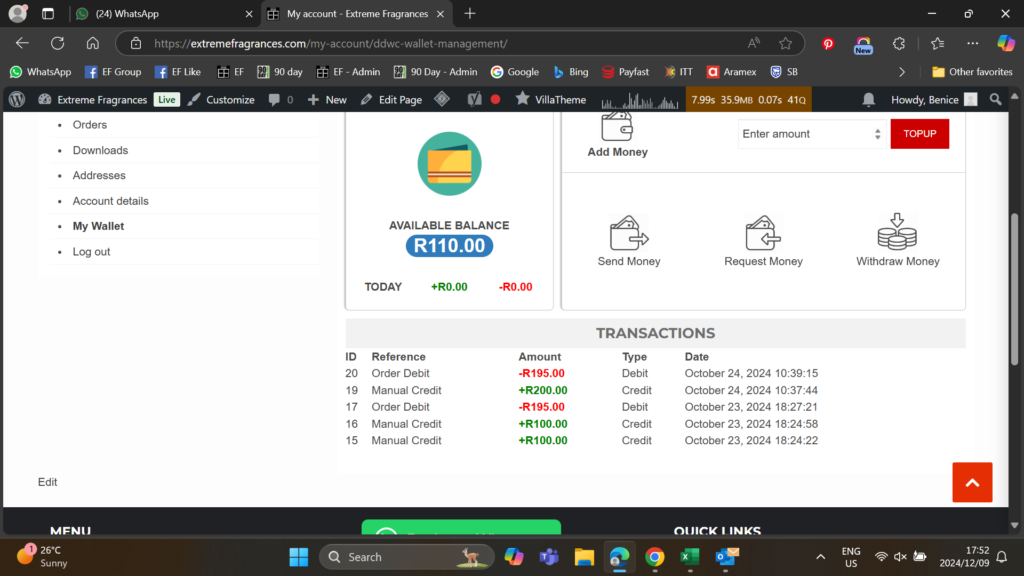
Wallet:

  • You can top up your wallet to use that amount to pay for orders
  • You can also select withdraw money and add your bank details – you will then get an email with OTP (One time pin) to complete this
  • Request Money and send money is only if you would like to add or ask for money from another user via their Wallet